
When would I use this?
- A customer handed you a check at the job site
- Someone paid cash
- A payment came through outside Exterio
- You need to see what a card payment cost you in fees
Do I need to record digital payments?
No. If a customer pays by credit card or ACH through the invoice link, the invoice is marked Paid automatically.
Manual recording is for payments taken outside the system.
How do I record a manual payment?
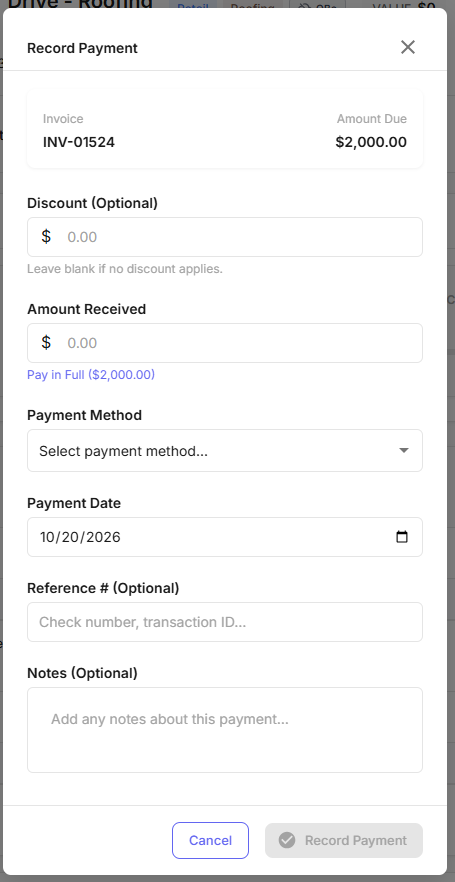
- Click the purple dollar icon on the invoice.
- Apply a discount if one applies.
- Enter the amount received — or click Pay in Full to fill in the total automatically.
- Select the payment method you received.
- Enter the payment date.
- Add a reference number and notes (both optional).
- Click Record Payment.
Where do I see what I actually received?
Hover over a paid invoice line to see:
- Total invoice amount
- Amount paid
- Total revenue
- Any discounts
- Any processing fees from credit card or ACH
For more detail, click the receipt icon in the Actions column to open the payments view for that invoice.
What are the processing fees?
| Payment type | Fee |
|---|---|
| Credit card | 3.2% + $0.30 per transaction |
| ACH | 1%, capped at $50 |
These come off digital payments automatically and appear in the invoice’s payment detail.
What does Pending status mean?
A customer opened the invoice and indicated they’ll pay in person. The invoice isn’t paid yet — it’s waiting on you to collect and record the payment.
Tips and gotchas
-
Record the check the day you get it. A check in someone’s truck is an invoice that still shows unpaid. Your financials are wrong, your P&L is wrong, and your automated overdue reminders are chasing a customer who already paid you. That’s the call you don’t want.
-
Recording a payment locks the invoice. Once an invoice is marked paid, it can’t be edited, voided, or deleted. If anything about the invoice is wrong, fix it before you record the payment.
-
Use the reference number field on checks. It’s optional and it’s what reconciles your Exterio records against your bank deposit at month end. Ten seconds now beats an hour later.
-
Watch Pending status. Pending means the customer told you they’re paying in person — it’s a commitment, not a payment. Those are the ones that sit unnoticed because the status isn’t “Sent” and doesn’t feel overdue.
-
Enter the actual payment date, not today’s date. If a check was dated the 28th and you’re recording it on the 3rd, use the 28th. Your revenue lands in the right month.
-
Check the fee before you assume the revenue. A $30,000 card payment costs roughly $960 in processing. The payment detail shows what you actually netted, and that’s the number that belongs in your job costing — not the invoice total.
-
A partial payment leaves a balance. Recording less than the full amount keeps the invoice open for the remainder. Use project balance line items on the follow-up invoice rather than calculating what’s left by hand.