
When would I use this?
- You just started using Exterio and want to call and text customers from it.
- You took over a rep’s territory and want to keep the number their customers already have.
- You want to call from your cell phone but show your business number.
- You want callers to get a voicemail or an automatic text when you miss their call.
Before you start
- Your company needs an active subscription. Trial accounts can’t use voice or SMS services.
- Your company needs a company phone number first. An Admin sets it up in Settings > Account Settings > Phone Numbers. If you see “Twilio is not configured for your account,” ask your Admin. See “Setup: Twilio Calling and Texting.”
- Texting needs SMS registration. Calling works right away. Texting works once your company’s SMS registration with the carriers is approved, which usually takes 5 to 7 business days.
- Have your cell phone handy. You’ll verify it with a phone call.
How do I open my phone settings in Exterio?
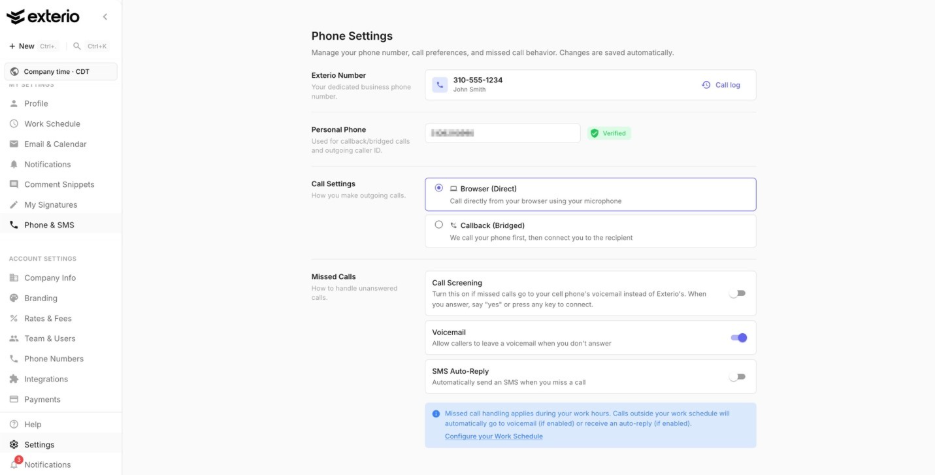
Go to Settings > My Settings > Phone & SMS. Changes on this page save automatically.
How do I get my Exterio phone number?
Click Provision Phone Number, then either claim a number your company already owns or search for a new one.
- Go to Settings > My Settings > Phone & SMS.
- Under Exterio Number, click Provision Phone Number.
- Choose your number:
- To keep an existing company number: under Available Company Numbers, select the number. A number that belonged to someone else shows “Previously:” and their name. Click Use This Number.
- To get a new number: search by Area Codes or by City, pick a number from Available Numbers, and click Provision Number.
- Under Personal Phone, enter your mobile or personal phone number.
- Click Verify.
- Make sure you can answer the phone, then click Call Me Now.
- Answer the call and enter the code shown on screen using your phone’s keypad.
Your number then shows under Exterio Number as your dedicated business phone number.
How do I verify my personal phone?
Enter your cell number under Personal Phone, click Verify, and answer the call Exterio makes to you.
When it’s done, your number shows Verified. Exterio uses it for callback calls and as your outgoing caller ID.
How do I choose how I make calls?
Under Call Settings, pick Browser (Direct) or Callback (Bridged).
|
Option |
How it works |
Best for |
|
Browser (Direct) |
Call directly from your browser using your computer’s microphone |
Office staff at a desk with a headset |
|
Callback (Bridged) |
Exterio calls your phone first, then connects you to the person you’re calling |
Reps in the field. Your personal phone must be set up above. |
What happens when I miss a call?
You choose what callers get under Missed Calls.
|
Setting |
What it does |
|
Call Screening |
Turn this on if missed calls go to your cell phone’s voicemail instead of Exterio’s. When you answer, say “yes” or press any key to connect. |
|
Voicemail |
Lets callers leave a voicemail when you don’t answer. On by default. |
|
SMS Auto-Reply |
Automatically texts callers when you miss their call. Write your own message in Message. The default is “Hi, this is an automated reply. I’ll get back to you as soon as possible.” |
Missed call handling applies during your work hours. Calls outside your work schedule automatically go to voicemail (if it’s on) or get an auto-reply (if it’s on). Set your hours with Configure your Work Schedule.
Where do I see my calls?
Click Call log under your Exterio number to see your calls.
Can I release my Exterio number?
Yes, but releasing a number can’t be undone. You’d need to provision a new number to use phone features again, and customers who have your old number can’t reach you on it. Talk to your Admin first. They can unlink a number so it stays with the company instead.
Tips and gotchas
-
Claim your predecessor’s number instead of getting a new one. If you took over another rep’s customers, pick their number under Available Company Numbers. Those customers already have it saved, and their calls and texts keep coming to the right person.
-
Turn on Call Screening if you use Callback calling. With callback, Exterio rings your cell. If you miss it, your cell’s voicemail can pick up instead of Exterio’s, and the message never makes it into Exterio. Call Screening fixes that.
-
Write an SMS Auto-Reply that sounds like you. A missed call from a homeowner with a leak is a lead going cold.
-
Set your work schedule before you rely on voicemail. Calls outside your work hours go straight to voicemail or auto-reply. If your schedule is wrong, customers calling during your real workday can miss you.
-
Don’t release a number to get a new one. Releasing is permanent and the number can go to another business. Ask your Admin to unlink it so the company keeps it.